
Working from a garden office is the ultimate remote work dream. You get the peace of nature, a clear physical commute from your home, and a dedicated space to focus.
However, there’s one catch: comfort.
All too often, garden offices are furnished with whatever spare furniture is lying around the house, or a stylish aesthetic is chosen over practicality. The result? Aching lower backs, stiff necks, and sore wrists at the end of the day.
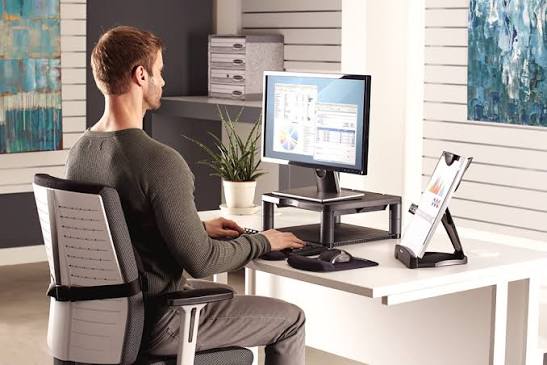
If you want to enjoy your garden sanctuary without paying for it with physical pain, you need to set up your workspace ergonomically. Here is your ultimate guide to getting your desk, chair, and screen height just right in a garden office.
The Foundation: Choosing and Positioning Your Desk
Your desk is the anchor of your garden office. If it’s the wrong height or poorly positioned, your posture will suffer from the moment you sit down.
The Right Height: The standard desk height is usually around 70–75 cm (28–30 inches), which works well for people between 5’8” and 5’10”. However, if you are shorter or taller, your feet should flat on the floor and your elbows should bend at a 90-to-100-degree angle when your hands rest on the keyboard.
Consider a Sit-Stand Desk: Garden offices are great for integrating movement. A standing desk converter or a fully adjustable motorized standing desk allows you to alternate between sitting and standing throughout the day, boosting circulation and energy levels.
Battle the Glare: Garden offices usually feature large windows and glass doors—which is great for mood, but terrible for screen glare. Position your desk perpendicular to the windows (neither facing them directly nor having your back to them). This minimizes harsh reflections on your monitor and prevents eye strain.
The Throne: Selecting and Adjusting Your Office Chair
Never skimp on your task chair. Your dining table chair or a trendy mid-century accent chair simply won’t cut it for an 8-hour workday. You need a fully adjustable ergonomic office chair.
Look for a chair with the following features and adjust them correctly:
Seat Height: Adjust the height so your feet rest flat on the floor (or on a footrest) and your knees are level with, or slightly lower than, your hips.
Lumbar Support: Your lower back has a natural inward curve. Your chair should have adjustable lumbar support that snugly fits into the small of your back to prevent slouching.
Seat Pan Depth: You should be able to fit two to three fingers between the front edge of the seat and the back of your knees. If the seat is too deep, it will cut off circulation to your legs; if it’s too short, your thighs won’t be properly supported.
Armrests: Adjust your armrests so they support your lower arms lightly, allowing your shoulders to relax. If your armrests force your shoulders up toward your ears, lower them or remove them altogether.
The View: Perfecting Your Screen Height
Neck strain is the #1 complaint of desk workers, and it almost always comes down to poor monitor placement. When you look down at a laptop screen all day, you are effectively asking your neck to hold up a bowling ball at an unnatural angle (“text neck”).
Eye Level is Key: The top third of your computer monitor should be at your exact eye level. When you look straight ahead, you should be looking slightly down at the center of the screen.
Use a Stand and External Peripherals: If you work on a laptop, never use it flat on the desk. Invest in a laptop stand (or stack of books) to raise the screen to eye level, and plug in a separate external keyboard and mouse.
Distance Matters: Position your monitor about an arm’s length away from your face (roughly 20 to 28 inches). If you find yourself leaning forward to read text, increase the font size rather than moving the screen closer.
Don’t Forget the Garden Environment
Setting up an ergonomic garden office goes beyond just furniture. Because garden structures are exposed to changing weather and lighting, keep these extra tips in mind:
- Temperature Control: Garden offices can heat up like greenhouses in the summer and freeze in the winter. Extreme temperatures cause muscle tension. Invest in proper insulation, a small heater, and a fan or AC unit to keep the room between 20–22°C (68–72°F).
- Lighting: In addition to natural light, you need good task lighting. Position a desk lamp on the opposite side of your writing hand to avoid shadows.
- Footwear: Garden offices often have hard floors (laminate, vinyl, or concrete). While working in cozy socks is nice, make sure your feet have adequate support, or keep a supportive pair of indoor shoes/slippers in your office.
An ergonomic garden office isn’t about luxury; it’s about longevity. By taking the time to properly adjust your desk height, dial in your ergonomic chair, and raise your screen to eye level, you protect your body from repetitive strain injuries and chronic pain.
Set it up right, and you’ll be able to enjoy the view of your garden pain-free for years to come!